3D Landscape Laser Engrave File Guide
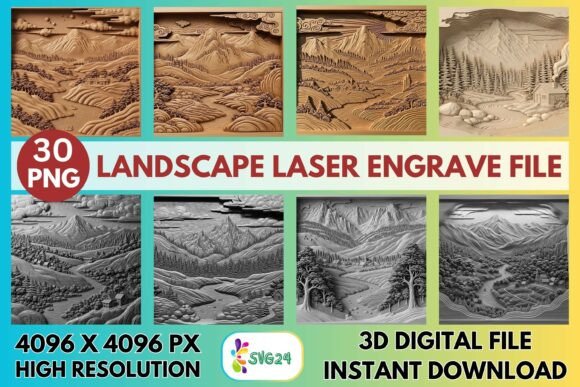
Transforming a flat sheet of wood or acrylic into a scene with mountains, valleys, and forests requires more than just a sharp blade; it demands a specific type of digital art. The 3D Landscape Laser Engrave File serves as the bridge between a two-dimensional image and a tactile, three-dimensional reality. By utilizing high-resolution grayscale data, these files instruct laser machines to vary power and speed, creating shadows and highlights that mimic natural depth. This approach allows makers to capture serene landscapes, rugged terrains, and intricate forest details with a level of professionalism that was once reserved for industrial manufacturing.
Understanding the Technology Behind the Depth
At its core, a 3D landscape engraving file is not a cut pattern but a map of light and shadow. Unlike vector files used for cutting shapes, these designs are raster-based, typically in PNG format. Each pixel's brightness corresponds to how much energy the laser applies to the material. Darker pixels result in deeper, darker burns, while lighter areas remain untouched or lightly scorched. This technique, often referred to as variable power engraving, relies heavily on the resolution of the source file. With dimensions reaching 4096×4096 px, the provided set ensures that even minute details in tree bark or cloud formations are preserved without pixelation.
The versatility of this format extends across various materials. While light-colored woods like birch or maple offer the highest contrast for deep blacks, the same files can be adapted for leather, acrylic, paper, and textiles. The transparent background feature simplifies the workflow, allowing users to position the landscape exactly where they want it on their project surface without fighting against unwanted white borders.
Perspectives for Beginners and Hobbyists
For those new to laser engraving, the learning curve can feel steep. Choosing the right design is often the first hurdle. A 3D Landscape Laser Engrave File offers a distinct advantage for beginners because it abstracts the complexity of manual shading. Instead of spending hours drawing gradients or adjusting node points in vector software, a beginner can load a pre-optimized grayscale image and let the machine handle the artistic nuance.
Hobbyists often prioritize ease of use and immediate gratification. This file set caters to that need by being "ready-to-print." The inclusion of recommended settings for popular machines like Glowforge removes the guesswork from the process. For example, a hobbyist using a Glowforge can simply select the grayscale mode, set the speed to 1000 and power to 90, and achieve a professional finish on their first attempt. This reliability builds confidence, encouraging experimentation with different materials like coasters, small wall plaques, or personalized gifts without the fear of ruining expensive stock due to poor file quality.
Strategic Value for Creators and Professionals
As users progress from hobbyists to professionals, priorities shift toward consistency, scalability, and commercial viability. For a small business owner selling custom home décor, the quality of the final product is directly tied to customer retention. A low-resolution image results in banding—visible lines of color that ruin the illusion of depth. The high-resolution nature of this file set ensures that every piece produced meets a premium standard, essential for maintaining a brand reputation.
Professionals also value flexibility. The set includes both coloring and grayscale versions, offering creative freedom. A designer might choose to print a colored version on paper for a greeting card collection, then switch to the grayscale version to engrave a matching wooden box. Furthermore, the ability to work seamlessly with industry-standard software like LightBurn allows for advanced customization. An experienced user might apply Jarvis dithering to enhance detail on textured surfaces or adjust the Lines Per Inch (LPI) to suit specific material densities. This level of control transforms a simple download into a versatile asset for a diverse product line.
Practical Applications Across Industries
The utility of a 3D Landscape Laser Engrave File spans multiple sectors, each with unique requirements:
- Retail and Gift Shops: Entrepreneurs can quickly produce seasonal items, such as rustic holiday cards or summer-themed signs, leveraging the nature themes to tap into current market trends.
- Interior Design: Designers can specify custom wall art that matches a room's aesthetic perfectly. The ability to engrave on large sheets of wood allows for statement pieces that add texture and warmth to modern spaces.
- Education: Educators can use these files to teach students about raster graphics, material science, and the physics of light interaction. The clear distinction between the digital file and the physical result provides an excellent case study for STEM programs.
- Event Planning: Planners can order custom signage or favors that reflect the venue's location, such as engraving a local mountain range onto wooden place cards for a wedding.
Evaluating Your Needs and Machine Compatibility
Before integrating this resource into your workflow, it is crucial to assess your equipment and goals. These files are optimized for CO₂ laser machines, including brands like xTool, Sculpfun, OMTech, and Glowforge. If you operate a diode laser, you may need to adjust exposure times significantly, though the high-resolution source remains beneficial.
Consider your primary output medium. If you focus on dark woods or metals, the contrast inherent in the grayscale file might require post-processing, such as staining or painting, to make the details pop. Conversely, if your niche is light-colored birch plywood or white acrylic, the file works immediately out of the box. Additionally, remember that these are digital assets. No physical product is shipped; the value lies entirely in the data. Users must have the necessary hardware to translate the PNG files into physical engravings.
Maximizing Quality and Efficiency
To get the most out of the 3D Landscape Laser Engrave File, attention to setup is key. For Glowforge users, setting the mode to "Grayscale – Vary Power" is non-negotiable for achieving the intended depth. Using masking tape can protect the surrounding area from soot, ensuring a clean finish on light-colored wood. For LightBurn users, selecting the correct dithering algorithm, such as Jarvis, can dramatically improve the smoothness of gradients.
It is also important to note that these files are non-editable in terms of layer manipulation. Resizing is the buyer's responsibility, so planning your project dimensions before importing the file is essential. Maintaining the aspect ratio prevents distortion, which could ruin the perspective of the landscape. By understanding these technical constraints and leveraging the high-quality source data, creators can consistently deliver stunning, dimension-rich artwork that stands out in a crowded market.